Showing posts with label Environment. Show all posts

Sunday, 14 April 2013

End of Easter

The Easter holiday is over and it was great to see all my friends and family and have some time to chill out but it also feels good to be back in Cardiff and in the working mood again.

I have been working on some of the particle effects in Unity and although the particles systems in Unity are easy to use I think they can be quite limiting on what can be achieved, that said there are some really useful tools in there for achieving what you want.

So far I have a trail added to the Fae's weapon:


This has a trail component on it causing the main trail, this was originally intended to just be active during attacks to add a swiping effect to emphasise the attacks but thought it worked when it's always on. I'll bring this up at the next group meeting and see what people think. The other part of it is a particle effect attached to the top of the staff which simulates in world space, hence the fact the particles trail behind, which I think has a nice added effect.

I also made some particles for the magic attack. At the moment the idea is energy is sucked in as he jumps into the air, then as he hits the ground with the staff the energy is expelled and some rocks fly up in the air from the impact. Again this hasn't been checked over by the ground and needs work but it's a start.


I have also been working on the church ruins which are used as the level transition and a possible boss fight. So far I have modelled them and I am in the process of unwrapping them although I am running into quite a few problems.

Either way here it is:


We have a play-testing session this Friday to see how we're doing so far so that's exciting, hopefully it will go well without too many hiccups.


Monday, 4 March 2013

Instruments of War!

So, it's been a while since I last posted and boy oh boy has a lot happened. But work is back on now and I'll need to work quickly to make up for my time away from the project.

Firstly I finished the staff, I wasn't completely pleased with how it turner out. I liked the idea behind it but I'm not convinced it worked out. Either way what's done is done.

Here it is, at 636 tris:


Other than that I made 3 instruments quickly in a day, which have been unwrapped, but not textured yet.

There's a recorder (272 tris):


Some pipes (280 tris):


A Violin (878 tris):


And finally a French Horn (1,004 tris)

Lots of work to do but it seems to be coming along, so I'll continue working away.


Wednesday, 9 January 2013

Turnarounds, turnarounds, turnarounds!

So pre-production is in full swing for next weeks deadline, I don't feel like I'm going to be able to get enough done for a great mark, but I can definitely produce enough to make production run smoothly. As well as this deadline I have a business studies deadline on Friday so I have to work on that too, so there's no shortage of work that's for sure. The business studies project doesn't have much to show yet, when my business card is finished I can put that up here, but I need to do some renders before then.

So for pre-production I have been working on the turnarounds for most of the characters and props as well as designing some of the props, it may seem late to be designing, but a lot of the props are very minor and don't require too much design, unlike the characters.

So I'm just going to post a load of turnarounds for you to look at, drawing is not my strong point but they seem accurate enough to be useful in production.

The Centaur's Ice Bow:


The 'Tholos Arch' building:


The Player Character's Staff


Ruin No 1:


Recorder Prop:


Violin Prop:


And the Centaur himself:


Quite a few things will be changed before the end, and some things will be changed when it gets to production as there won't be enough time to change them in pre-production now. But some things like making the instruments more unique and less like ordinary instruments, but for now I have something.

The ruins will also be split up into smaller parts, such as separate pieces of broken wall, rubble and floors, so they can be adjusted if gameplay requires it and also so they can be mixed and matched into different designs. This gives us some more freedom and also works as a safety net.


Monday, 17 December 2012

Specialist Animation 2

It's been a while since I have posted because the project I've been working on is not the most visual project. We were doing an assignment in Unity in which we had to get certain game elements working. This was good as one of our biggest concerns for our major project game was that we do not have a programmer to create gameplay elements.

I'm pleased to see that the project went much better than expected, not just for me but for our entire team. We have gotten much more done than we expected to and it has allowed us to widen our scope and hopefully add even more to the game. We managed to get a lot of the puzzles done, as well as some we were not sure we had time to do and we managed to get certain elements like the camera and the AI working to a decent standard.

In the project I made a camera with 3 levels of zoom and a special fixed camera position for the boss fight, it's also possible to look around using the mouse. I created a door in which you need to pick up 2 keys, walk over to an object and press the F key to open a gate and I created some 'dragons' which attack you by breathing fire, this does damage and has a 1 in 4 chance of causing burn damage over time. The final thing I created was a box which you can go to, press F and it heals you to full health and stops the burn damage.

Here's a quick gameplay video:


There are a few problems such as the boss camera has a weird flick to it when it transitions between views but for a couple of weeks work in a subject I don't normally dabble in I was quite pleased. There's plenty more to do but between the members of our group using Unity we should have it under control.

We have also been using Playmaker, an add-on for Unity which you can get from the Unity Store which allows for scripting in a more visual sense, similar to Kismet in UDK.

We have now got until we go back to uni in January to finish the pre-production for this game so the pressure is on but I can't wait to get started on the production.

Here is a WIP of the Centaur:


I still need to do more work on the head, hair ect but I'm pretty pleased with it so far as drawing is not exactly my strong point, but I can see the improvement over last years major project work so that's always motivating.

I also found a digital painting I did over summer which I never got round to finishing because I ran out of time so I might as well post that here too. I attempted to recreate someone else's art work as I saw it as a good way of working outside of my comfort zone and to see how other people have done things.

This is my drawing:


Here is the original made by justaman78 over on DeviantArt. It was produced for the game HAVEN.


Mine is clearly better... what?.. fine their image is much better, but then learning from people better than you is a great way to improve.

I enjoyed learning some new styles during this drawing and I think it has helped prepare me for pre-production and even helped with the above centaur picture, so time well spent I think.


Monday, 16 July 2012

More broken stone

So after completing the wall a few days back I was quite pleased with how it turned out and tried to do a similar thing with another model. I was going to sculpt the bricks for the end part of the wall I was making in conjunction with that one, but I'm not sure I could take carving away at more bricks yet...

Instead I made a few floor stones or stepping stones which were quick cuboids which I added some subdivisions to and then quickly moved them around to a more organic shape, I then took them into Mudbox and did the same as I did with the wall

Here are the results:


In Mudbox:

In 3ds Max as a normal map:


It 288 polys in the end for the low poly mesh with normal map on it, perhaps slightly high for what it is but it was just a quick exercise so isn't too bad. The things that look like folds near the corners of the stones is due to my bad unwrapping (surprise surprise) I could clean them up but for what its worth I'm just going to leave it

Theres no diffuse or spec on there, just the normal map

Thursday, 12 July 2012

Wall!

Just a quick update from the wall from yesterdays blog post, set up the normal maps, but a quick diffuse and AO texture on it and sorted the spec out. Overall? I think it turned out quite well, take a look for yourself.


I think it looks best from front on, but then thats normal maps for you isn't it. It turned out to be 1532 polys, perhaps a little higher than I would have liked but it could be cut down if the brief required it, its quite flexable but it looks good at this level with a decently low poly count.

The top hasn't had any work done to it, and I would want to do something to that before I thought about using it in a game or submitting it for an assignment. I still have an end piece of wall which I was creating beside this that could be placed anywhere along the wall for more customisation during the map layout. And...come to think of it I saw this wall as being able to be placed side by side to make a longer wall, but I could have laid the stones out better and sorted the top out so it would connect better...isn't hindsight a wonderful thing...

Tuesday, 10 July 2012

Back to work!

So yeah....it's been a while peeps...

And erm...I haven't done much work tbh...I found the free time thing quite addicting and have been doing nothing but seeing my girlfriend, friends, family and playing games...

But its been fun!

I started getting back to work over the last few days, I started making a fairy character in preparation for next year university project, but that hasn't been going oh so well... I think jumping straight back into a character was a mistake, should have gone for a prop or weapon first really. I'll keep working on the fairy and see if I can get it to look half decent, then I'll post it up on here.

Other than that I started modelling a wall yesterday, and it went quite well... then I put it into mudbox and it went great...then I kept mudboxing it and I don't think I looks so good now, probably overworked it slightly. Either way here is the mudbox mesh, I have tested putting it into max on a low poly model as a normal map and it works fairly well, but I think with a bit of tweaking I can get it to look better, if I works well I'll stick that up here when i get round to it to...

anyway here it is in max before sculpting:


And here it is in mudbox after sculpting:


I think the stones towards the top of the wall work better than the ones at the bottom as I think I overdid the damage a bit too much but I wanted the damage to be more severe towards the bottom of the wall, like it has been hit a clipped by things passing it. Hopefully that came across in the sculpt.

Sunday, 20 May 2012

and rest...

Finally... major project has been handed in. It's been fun and a brilliant learning experience that has set me up for next years project and I'm kinda sad it's over. But now I have this thing called free time, I don't know if you've heard of it or not, its quite enjoyable.

For now all I have to do is make an industry standard showreel by tomorrow evening in preparation for this years Glammies in case we get a nomination, not going to happen but making the show reel should be a decent experience so I'm not complaining.

During this free time I'm going to start working on my 3rd year project to get a nice big head start so there is less stress and more time for polish. We've already gathered our group together and we are having a meeting tomorrow after the showreel hand in to get everything sorted out and come up with our initial idea so we can dish out the work and get going. Also over summer I'll be working on a few of my personal projects just to improve my work and keep me busy. For one I would like to take someone's concept images and model a character based on them, this is a test as I feel many of my models and textures are lacking and this is probably due to my pre production, so I will test this theory and see what happens...

But enough about theoretical futures... here is the course showreel I handed in for my major project.


Credit also goes to Matt Watson and Hollie Sheppard who provided some of the Ogre animations and to Joe Hornsby who created Ogre animations as well as setting up all of the UDK stuff for characters and animations and helped to set up the weapons and game.

Tuesday, 15 May 2012

FMX and Stuttgart

Hey everyone, it's been a week or so since my last post and that is because I have been in Germany for the FMX festival in Stuttgart. It was an amazing trip, a great laugh and really interesting, hopefully I will be able to make it again next year, money permitting, and I will be able to show my work off to industry professionals.

There was some really interesting talks I went to see, and many that I didn't get to make, the highlights included Building Creatures at Weta, the many John Carter talks about creatures and environments, Animating Reptiles presented by Stuart Sumida and the Mass Effect 3 Tech Art.

Manning the University of Glamorgan stall was also fun, I got to meet some really interesting people from many backgrounds and had a good few conversations with people, and while I wasn't talking to people I was either talking to other people manning the stall with me or spending it looking up information on unity for next years project.

But back to major project...I didn't get any work done over the FMX week as I didn't take it with me, I thought it would be too much hassle taking it there and back and I wasn't going to get much work done anyway, but that obviously adds much more stress on this final week, and I have plenty to do for the Friday submittal.

Since the last post I fixed the problem with the club mesh flashing, I only had to make a physics asset for some unknown reason but trying to find a solution to this took quite a while, but I made it and then wrote some script to reference the physics asset so that works now.

I have also been working on the textures for lots of the models after the 1st submittal feedback, I have pretty much started the club and crossbow textures from scratch, in some cases I think this worked but in other cases it has made it quite awkward to work such as changing the firing mechanism of the crossbow from wood to metal.

No pretty pictures this time I'm afraid, no time to work on that, but will be posting some of my turnarounds and screencaps on here as I create them for submittal

Saturday, 5 May 2012

2 weeks to go....

And only one week of work time left...

Scary thought...

So the deadline is now 13 days away, and about 6 of them days are taken up with my FMX trip to Germany, so realistically I have 7 days left of work left on the project that I feel like I've been working on for years

The project is nearing an end (both in terms of the deadline and the production process) and I feel we've come quite far in the last 13 weeks, but I don't want to mess it up at the end so working hats on for double crunch time

Since the last post I had my feedback for the 1st submittal and while most of my work was not viewable due to an error with the video (most likely my fault during the rendering) I was able to get some really good, in depth feedback on my work, a lot of which was done over Easter which none of the tutors have seen yet. So it was nice to get a fresh view from them and it has opened my eyes to the errors of my work.

The feedback mostly consisted of my models being modelled too perfectly, with too many straight lines and everything looking like it was made in a factory, which is a very good point now I look at it as these are items made by Mongolian warriors and Ogres...

To remedy this I have gone back and edited a few of the models by only shifting around points so that I dont destroy the UV unwraps. This limits me a bit to the changes I can make but it also saves a lot of time, and time is something we don't have much of at this stage.

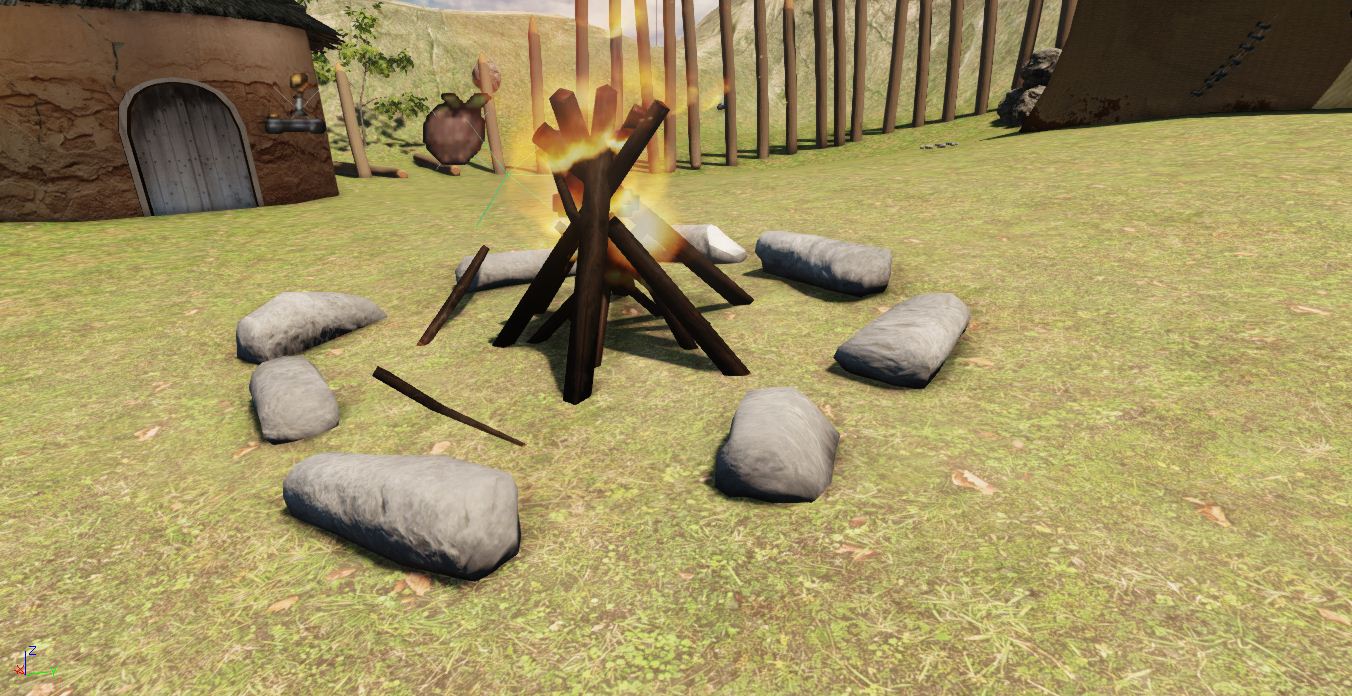
Here is the reworked campfire and weapon pickup points:


I also edited the UV unwraps and re-textured and viewport canvased it to get rid of the huge horrible seams it had on it.

And I have made the post on which the banner stands less straight, although I could not do too much with this as there were only a few edge loops on that part of the model:


It's a small change but I think it helps.

Another recurring theme in my feedback was that the colours were very flat, they sometimes had lighter and darker areas but they were all the same hue. This is another thing that I never noticed until it was pointed out to me, then it became obvious. So that is the other major change I am going to make over the next couple of weeks.

I have also added some more war paint to the Ogre. I was going to leave the paint as it was so it was more subtle than overpowering but because we can no longer make the teams into Mongolians and Ogres (due to me and Joe not fully understanding how to achieve this while also getting it to load my scripts) we are using the war paint as a team signifier. So Ogres on the red team have red war paint, and Ogres on the blue team have blue war paint.

On the same note the green cloth of the male Mongolian I modelled has now be changed to red and blue respectively. It is not the ideal scenario but as a quick and easy solution at the end of the assignment I think it works quite well.

Overall thought the feedback was good, I was told I had everything finished more or less, so I had nothing too big to worry about from now on, I just need to edit textures and models to make them look better and score extra marks, so that was encouraging to hear. And in terms of scripting and the like, I think I only need to find a way to remove the link gun on spawn and I will have finished messing with it and will leave it so I don't monumentally break everything in the last few days

On a side note, I just compiled my digital sketchbook for my Visual Forms hand it which is not until the 8th (or something near there) but I have had to complete it early as I will be in Germany then. I would have handed it in but the tutors still haven't put up a digital dropbox for them so I have handed them to Jess and she has agreed to submit them for me :)


Sunday, 29 April 2012

Almost 1st submittal time...

So tomorrow I have the first submittal deadline at 6:30pm so I have been rendering turnarounds like nobody's business...there are a LOT of turnarounds...

But as for work it's gone quite well over the last few days, I got the crossbow to face the right way now. It wasn't to do with the coding which would explain why I couldn't see it, it was just one of the settings on the skeletal mesh editor that told it to rotate at 90 degrees for some reason.

I've also scaled the crossbow up and the club down so it is more realistic. I tried doing this before but couldn't get the sizes so change, apparently you have to rescale and then re-skin in Max before exporting again. So I just created a used a Scale variable in the code to save me time.

I got the arrow flying more realistically, although sometimes it would mess up... either travelling very slowly or seemingly not appearing. But I went back on to the net and found a different piece of code for programming projectile static meshes and customised that one to fit the crossbow and arrow. This has worked much better now and I even have it so that the arrows stick into walls and objects! It goes wrong when you kill a player as the arrow floats where it hit the player but there is a chance I wont be able to fix that in time as I wouldn't really know where to start.

Here's a video of the crossbow working correctly and the arrows sticking into the walls:


I've also set up some sound cues for the firing of the crossbow, the impact of the arrow and attacking with the club (although the club hit is really annoying and needs to be changed). I then linked them through the code so that they play at the times specified and hey presto!

I've also used kismet for the first time in this project to change the starting weapons of the characters...but this has been met with limited success so far. I tried to get it so that when a player spawns it removes the existing weapon (the link gun) and replaces it with a custom weapon (the club) but at the moment it removes everyone's weapons and only gives them a club every time a player spawns, which is annoying when your trying to use a crossbow. I'll have to look into this more but for now I'm making it so the player keeps the link gun but also gets the club, for testing it's fine as the AI prefer the club and it never runs out of ammo so they don't use the link gun, but that will need to change.

Here's a screenshot of the simple kismet I have set up:


Joe did find an error earlier with getting his code and my code to run in game, as his code is run before my code due to its placement in the config folder but it references my packages. We cannot load my packages first though as they all expand on the default UDK code.

Hopefully this wont be too much of a problem come the final submission but we may not have it working in time for the 1st submittal which is a shame, but for the first deadline I don't think we've done too badly.

Friday, 27 April 2012

3 day post streak!

This is now the 3rd day in a row where I believe I have enough work to warrant another blog post, which is great. Although I really don't think I'll be able to keep this up much longer, I'm starting to hit roadblocks now and works beginning to slow down.

Today I managed to update the flag texture somewhat. I added a bit of normal detail to the golden part as was my first intention, I did this by finding an image and then using it as a Mudbox stencil. I also wanted to add lots of cloth folds to the flag...but I didn't think it through when I upwrapped it and lay all of the flag pieces on top of each other meaning Mudbox cant render it out...ah well... lesson learned I guess.

Here's the flag now:


Its far from finished...but well...you get the picture.

I now have the crossbow firing arrows semi-correctly. The arrow mesh now points in the direction you are looking, so the arrow no longer comes out sideways, and it now travels at a more normal speed. I also rescaled the arrow so that it is more realistic compared to the crossbow and players. The problem at the moment is it has a wierd bug while flying through the air and I'm not entirely sure what's causing it. Either the mesh emitter is firing more than one mesh and it's confusing it or something is going wrong while rendering it and it's not showing correctly. I'm going to try and take a closer look at this soon by getting the AI to fire some arrows and trying to observe it from a different angle.

I would post a screenshot of the arrow going wrong but I could be here all day trying to get the timing right.

Another thing I have managed to figure out is the weird shadows being cast on the main tent. This was, as suspected, a lightmass unwrap issue. I just had to go back in and take the lightmass unwrap to more extremes and it seemed to do the trick. It took some time testing it every time I tweaked it though, as I had to rebuild the lighting in UDK which currently takes around 5 minutes.


And last but certainly not least...I managed to playtest it today, with bots running round and managed to make it a proper capture the flag game that the bots join in and play, which is great. I would love to have seen the smile on my face for the first 10 minutes of playing it until I realised I should probably actually be working. I screen recorded a video of the bots all running round playing capture the flag, the quality may not be particularly good on here but I'll be doing a better render sometime before Monday's deadline anyway.


There are no Ogres or Mongolians running around at the moment as I haven't added Joe's script files or USk packages into my UDK setup yet, but that will be easy enough to sort out, I'm just waiting for them to be completed. The weapons are not running yet either although I have re-done the script for the club now and the AI can use the weapons. (They can use the crossbow anyway, I'm yet to test the club but it's using almost identical code) I decided to leave the weapons out as they are currently firing lasers to determine impact and the club is long ranged and problems like that so I thought for the viewing it would just be better to use the UT3 weapons.

Tomorrow I will probably use most of my time trying to get the weapon scripts working how I want them too, just so I have some kind of working weapons for Monday's first submittal, but if I find I'm getting nowhere with it I'll get on with some texturing as a lot fo that still needs completing.

Thursday, 26 April 2012

Update ALL THE DAYS!

It was only yesterday that I last posted a blog entry, and already I feel I should make another. For saying I didn't start work today until around 7:30pm I got a fair amount done.

First things first, I already figured out what was wrong with the UDK viewports...well I didn't actually find out what was wrong, but I found a fix. There is a menu arrow in the corner of the viewport which you can click on, then go to show, then return it to defaults. That seemed to do the trick.

The flag is now mostly sorted out, I have the cloth physics working on it, although part of it is wrapping round so I will have to check the skinning of that later. It has very minimal textures but all of the coding for it is already complete. I have a red and a blue flag, both implemented into the game and you can pick one up and carry it to the other flag to score points, so I effectively have a capture the flag game using my own flags now.

There's not much here I can show you in pictures as its mostly code work. But I can show you a picture of the flag. The opacity map is currently in progress and that's why the flags are only partly ripped.


As a bonus to this I made a custom flag base, so that it didn't use the very sci-fi style UT3 one. It's nothing special but it's rather small in the game and wont attract too much attention so I would rather spend my time on other objects.

This is the base, modelled, unwrapped and with a base texture on it:


Then finally, as I have the script sorted for the base too I can get the flag to spawn above the base and can be picked up and used as normal. Here's a screeny:


Interestingly it tries to apply the original UT3 texture to my mesh when you actually run the game. There is probably a texture override in the code somewhere that I haven't found yet but I'm sure that wont be too much of a problem.

The flag also sits at a 90 degree angle to the base, which in itself isn't too much of a problem but when a player picks the flag up it partly hangs in front of their face, which is annoying to say the least... but that will be a simple changing of co-ordinates in the code...I'm hoping...

Either way I seem to be getting the hang of the code now, and I'm able to edit it fairly fast without too much trouble. I feel like I could do anything with it at the moment, but then I keep looking at the weapon scripts and thinking maybe not... but we shall see...

As a final bonus though...


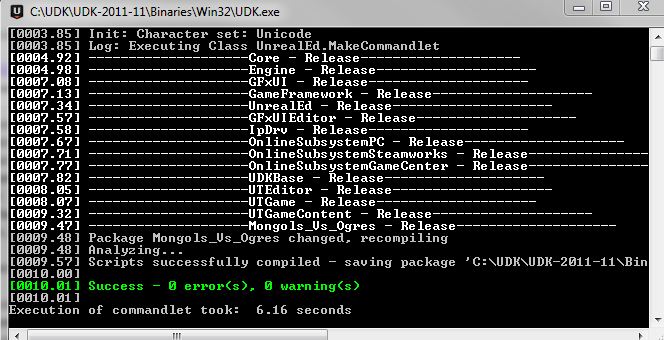
0 Errors and 0 Warnings! I've not seen that since I first started up UDK and now I'm managing to keep it this way, which is awesome.


Wednesday, 25 April 2012

I'm losing track on what's new now...

Its been around a week and a half since my last post... how bad of me...

Anyway, a few of the days of were spent on getting my essay done for contextual studies, I wrote it on the difference between Western and Eastern game titles and why they differ. It was quite a fun essay to write and research but I had some trouble getting quotes for it...I was pretty pleased with what I managed in the end though...probably one of my better essays...hopefully...

As the title suggests, I'm flicking between bits of work all over the place at the moment, trying to get everything finished of at least in a workable state before the 1st submittal this Friday... I highly doubt everything will be working as I want by then, as the weapon script is proving more difficult than I anticipated...but hopefully by the time the final submittal roles round they should be working...

I'm saying hopefully a lot, that probably isn't good...

But on to work!

I've solved the wall lighting issue where a seam would appear about 3/4 of the way up the mesh and it didn't seem to show on any texture maps. It was just a smoothing groups issue...the amount of times that catches me out... but that's all sorted now, and I even went back and made a slight improvements to the wall while I was there.

I got around the issue of not being able to fire inside the cave as I was using 2 landscapes to make the holes for the cave, as you cant make holes in the landscape as its still in early development. To get around this I just made a quick mesh in 3DS Max and then stole the UDK texture I was using on the other cliffs. It's by no means ideal and it still needs work, but it proved to be a fairly simple, quick fix so I'm not complaining.


I have rescripted the crossbow weapon using the UT3 shock rifle files and adjusting the code. I'm not going to post it all here because it is really long and in 5 or so separate files. But basically I have the weapon in UDK and you can fire it. Although at the moment the crossbow is held sideways, it shoots giant arrows that don't face the right way and lasers shoot out of it and explode people...so yeah, not finalised yet. But I know how to solve most of them problems, or can at least work it out, the only thing I'm unsure about it the mesh emitter which is used to fire the arrows...but if worst comes to worst I can just use a particle emitter and try to make it look like a fast arrow.

Here's the crossbow being held wrong:


Here's the arrow not flying correctly:


As an added weapon bonus, I have the club pickup working, kinda... It's rotating above the pickup point fine, but I think the scale is too big and the pivot is just too high so when he holds it you can only make out the bottom of the handle, but that should be an easy change now that I have it working in game.


I've also made a flag tonight, working from since I left Uni and went shopping, I have managed to model, unwrap and skin a flag that will replace the default UT3 flag. It is 1144 polys, so that works out at 2288 tris in UDK. I have only got base textures on the flag at the moment, but I have a red and blue flag made on the same texture map so the team colours will work. I have not yet set up the physics and cloth on the flag yet so it is only static, but it should flow like the banners do on my environment.


I've made the game a Capture the Flag game mode now...but that only involves changing the prefix to the map name, but I have the flag capture points in now, so it's a playable CTF game!

Hmm, other things I have done...I have tweaked little bits of textures here and there, adding a few spots of mud or rips to the materials. But nothing too major there. Oh, and I made some blocking volumes to keep players for getting out of the level, it is a bit of a cheap way of keeping them in, but it saves no end of time play testing all the ways someone could escape from the map and then tweaking the map again so I'm not complaining.

An interesting error I have come across, which is almost 100% a user error not a program error, is that I have seemed to hide all of the textures and materials as well as deleting and not showing new actor classes. I have tried flicking it though all the different viewing modes but cant seem to figure it out, which is interesting...Luckily it's not just my map, the base UDK ones are like it too and the textures load when you play it, so I hopefully haven't horribly destroyed it a few days before 1st submission...


Makes it look snowy which is cool, but if anyone knows what has caused this could you just drop me a message with a fix? I'm sure I'll figure it out soon enough but any time saved on this project is a massive help. Maybe I only need a computer restart or something...but hopefully it wont stick around and be a problem...

I just managed to get no errors or warnings while compiling the UDK scripts...so that's a nice little personal victory for me

I was writing this blog as I was working on my other screen and I'm just gob smacked at how fast I'm working at the moment, I cant keep up blogging with everything that's getting done, and that's a really good feeling

/Superlongblogpost

Sunday, 15 April 2012

Caves and Script Changes

It's not been as long as usual since my last update but I'm going to try and update more often in smaller bites for the next few weeks as we're coming to the end of the project and there will be lots of changes and rushing about to come in the future, so here goes...

Possibly the biggest change I have made since the last update is texturing the cave. I have made a very quick diffuse map and quickly gone over it in Mudbox. I still need to improve it quite a bit but for how quick it was to make I think the results have turned out well.

There were a few problems with the unwrapping though, and that has continued to be a pain throughout the texturing of the cave, there are quite a few seams and they don't seem to be connecting well with the normal maps taken out of Mudbox. I seem to remember reading about a fix to this but to save time searching I manually went in with viewport canvas in 3DS Max to fill in the seams of the diffuse and normal maps.

I do intend to expand on this texture, adding unique parts to it in different rooms such as scratches or cave paintings, but that will most likely be a tweaking thing towards the end of the project. Here it is as it stands now though.


The cave itself was around 800 polys but I was getting some big smoothing issues, I applied meshsmooth to it which brought it up to around 3500 polys and I liked the result, plus it fixed my smoothing issues so I decided to keep it. The game still runs at about 33FPS while inside the cave as opposed to around 28FPS outside so the extra polys can be spared.

I have also added a few more of the rocks from outside in the cave to build on the walls as I intended to only build the outline of the cave in Max and then improve on it my adding rocks in UDK. Also doing it this way saves on memory as the rocks are already instanced in the scene so they do not take up as much memory as a brand new mesh.

I also thought that I would post the script for the weapons on here which I did a few weeks back incase anyone is interested in that or can point out any of the errors. I have them recognising the mesh in the game and have them doing damage when 'firing' but I have not yet set up the animations as I don't have them yet, and the meshes don't sit right in the 1st and 3rd person perspectives so I need to tweak the code to get them to sit right.

Here are the 2 files used to make the club work:


Here are the 2 that make the crossbow work:


And here is the bit of code that I changed in the script for the weapon pick up to change the static mesh to the one I have made:


All of the code there was taken from Epic's official UDK help pages at UDN and then edited to pick up my skeletal meshes and to have the amount of ammo and do the amount of damage ect that I want it to do in my game.

I have commented out (text in green) the animation sections for now as I don't have the animation files but I will fix them as soon as possible.

I intend to get the weapons working correctly in the next couple of weeks before the 1st submittal deadline, although that will probably be without the animations. Hopefully I can get that done and we will have a finished looking game ready to show by then, even if it will need quite a bit of tweaking.

So much for shorter blog posts....


Thursday, 12 April 2012

It's starting to come together!

Been just over a week since the last update, kept meaning to do it but I never had the time. But I do now!

So where to start...lets have a screenshot of the environment so far


Its looking pretty good now... If I do say so myself... better than I could see it being a few weeks ago anyway. The biggest change since last time must be the cave, it's only a model at the moment and its in the stage of unwrapping (which is being a pain) but I will hopefully have that mudboxed and textured soon.

As the landscaping tools I used in UDK are still in their infancy it does not yet have the ability it but holes in it for the cave, so I have made a second landscape over the top of it, although this comes with a few problems...firstly the shadows seem to be messing up on the hills, not entirely sure why. Secondly when stood underneath the 2nd landscape all bullets seem to disappear...

The trees and rocks that have been added are just UDK base meshes that I'm using as I don't have the time to model all of the rocks and foliage as well as everything else. I did have to make a collision mesh for one of the trees and all the rocks but they only took a short amount of time.

There's banners outside the Mongol camp and the Ogre cave now. I didn't intend to make them in pre production but I was getting a lot of feedback saying the environment needed more colour so it seemed like a fun way to add a bit of variety.

There is also some torches in the scene now, although they have only been very basically textured. They have the same fire effect as the campfire that have just been scaled down slightly.

Anyway, enough of the text, more pictures are needed! This is a picture of the banner that's outside the Mongol camp, it is a skeletal mesh meaning it can be animated, and its using cloth physics on the flag, I was going to record a video of it flapping in the wind but it's not screen recording very well...either way it works...


And here is the one outside the Ogre cave:


As a side note the textures have been updated since these screenshots and I have used an opacity map to give it a frayed and damaged look.

Up next is the torch:


Like I said, the cave and the torches are not properly textured yet, but you get the point. The firs is above the torches and a separate light just in front of the mesh gives the cave its lighting. When I tried to add some of the lights on the torches in the Mongol camp it broke the world lighting so I will probably leave them as unlit torches, but the ones in the cave work and they are the important ones.

Next... some puddles...


I've added a plane of water to the environment but placed it so it only leaves puddles rather than swim-able water. There are multiple puddles in the cave (you might struggle to see them but once the cave is textured they will stand out more) and a large puddle outside the cave.

Finally, and least impressively...
I gave the Ogre a bit of war paint, more to come...


But it feels like a good amount of work for a week and a half-ish and I'm still getting lots of free time while I'm home! Now I just need to start finallising everything so it looks more polished and write my critical studies essay...but it's looking good so far!

/optimism