Showing posts with label Flag. Show all posts

Friday, 27 April 2012

3 day post streak!

This is now the 3rd day in a row where I believe I have enough work to warrant another blog post, which is great. Although I really don't think I'll be able to keep this up much longer, I'm starting to hit roadblocks now and works beginning to slow down.

Today I managed to update the flag texture somewhat. I added a bit of normal detail to the golden part as was my first intention, I did this by finding an image and then using it as a Mudbox stencil. I also wanted to add lots of cloth folds to the flag...but I didn't think it through when I upwrapped it and lay all of the flag pieces on top of each other meaning Mudbox cant render it out...ah well... lesson learned I guess.

Here's the flag now:


Its far from finished...but well...you get the picture.

I now have the crossbow firing arrows semi-correctly. The arrow mesh now points in the direction you are looking, so the arrow no longer comes out sideways, and it now travels at a more normal speed. I also rescaled the arrow so that it is more realistic compared to the crossbow and players. The problem at the moment is it has a wierd bug while flying through the air and I'm not entirely sure what's causing it. Either the mesh emitter is firing more than one mesh and it's confusing it or something is going wrong while rendering it and it's not showing correctly. I'm going to try and take a closer look at this soon by getting the AI to fire some arrows and trying to observe it from a different angle.

I would post a screenshot of the arrow going wrong but I could be here all day trying to get the timing right.

Another thing I have managed to figure out is the weird shadows being cast on the main tent. This was, as suspected, a lightmass unwrap issue. I just had to go back in and take the lightmass unwrap to more extremes and it seemed to do the trick. It took some time testing it every time I tweaked it though, as I had to rebuild the lighting in UDK which currently takes around 5 minutes.


And last but certainly not least...I managed to playtest it today, with bots running round and managed to make it a proper capture the flag game that the bots join in and play, which is great. I would love to have seen the smile on my face for the first 10 minutes of playing it until I realised I should probably actually be working. I screen recorded a video of the bots all running round playing capture the flag, the quality may not be particularly good on here but I'll be doing a better render sometime before Monday's deadline anyway.


There are no Ogres or Mongolians running around at the moment as I haven't added Joe's script files or USk packages into my UDK setup yet, but that will be easy enough to sort out, I'm just waiting for them to be completed. The weapons are not running yet either although I have re-done the script for the club now and the AI can use the weapons. (They can use the crossbow anyway, I'm yet to test the club but it's using almost identical code) I decided to leave the weapons out as they are currently firing lasers to determine impact and the club is long ranged and problems like that so I thought for the viewing it would just be better to use the UT3 weapons.

Tomorrow I will probably use most of my time trying to get the weapon scripts working how I want them too, just so I have some kind of working weapons for Monday's first submittal, but if I find I'm getting nowhere with it I'll get on with some texturing as a lot fo that still needs completing.

Thursday, 26 April 2012

Update ALL THE DAYS!

It was only yesterday that I last posted a blog entry, and already I feel I should make another. For saying I didn't start work today until around 7:30pm I got a fair amount done.

First things first, I already figured out what was wrong with the UDK viewports...well I didn't actually find out what was wrong, but I found a fix. There is a menu arrow in the corner of the viewport which you can click on, then go to show, then return it to defaults. That seemed to do the trick.

The flag is now mostly sorted out, I have the cloth physics working on it, although part of it is wrapping round so I will have to check the skinning of that later. It has very minimal textures but all of the coding for it is already complete. I have a red and a blue flag, both implemented into the game and you can pick one up and carry it to the other flag to score points, so I effectively have a capture the flag game using my own flags now.

There's not much here I can show you in pictures as its mostly code work. But I can show you a picture of the flag. The opacity map is currently in progress and that's why the flags are only partly ripped.


As a bonus to this I made a custom flag base, so that it didn't use the very sci-fi style UT3 one. It's nothing special but it's rather small in the game and wont attract too much attention so I would rather spend my time on other objects.

This is the base, modelled, unwrapped and with a base texture on it:


Then finally, as I have the script sorted for the base too I can get the flag to spawn above the base and can be picked up and used as normal. Here's a screeny:


Interestingly it tries to apply the original UT3 texture to my mesh when you actually run the game. There is probably a texture override in the code somewhere that I haven't found yet but I'm sure that wont be too much of a problem.

The flag also sits at a 90 degree angle to the base, which in itself isn't too much of a problem but when a player picks the flag up it partly hangs in front of their face, which is annoying to say the least... but that will be a simple changing of co-ordinates in the code...I'm hoping...

Either way I seem to be getting the hang of the code now, and I'm able to edit it fairly fast without too much trouble. I feel like I could do anything with it at the moment, but then I keep looking at the weapon scripts and thinking maybe not... but we shall see...

As a final bonus though...


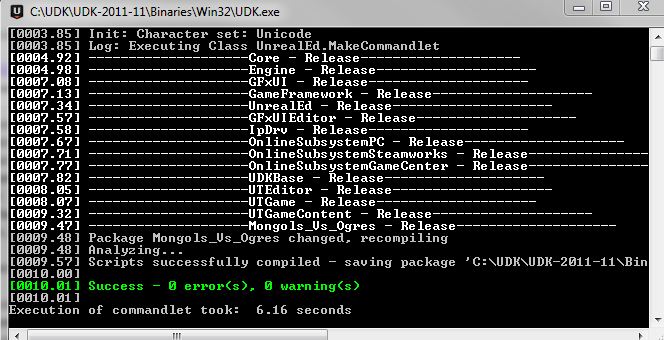
0 Errors and 0 Warnings! I've not seen that since I first started up UDK and now I'm managing to keep it this way, which is awesome.


Wednesday, 25 April 2012

I'm losing track on what's new now...

Its been around a week and a half since my last post... how bad of me...

Anyway, a few of the days of were spent on getting my essay done for contextual studies, I wrote it on the difference between Western and Eastern game titles and why they differ. It was quite a fun essay to write and research but I had some trouble getting quotes for it...I was pretty pleased with what I managed in the end though...probably one of my better essays...hopefully...

As the title suggests, I'm flicking between bits of work all over the place at the moment, trying to get everything finished of at least in a workable state before the 1st submittal this Friday... I highly doubt everything will be working as I want by then, as the weapon script is proving more difficult than I anticipated...but hopefully by the time the final submittal roles round they should be working...

I'm saying hopefully a lot, that probably isn't good...

But on to work!

I've solved the wall lighting issue where a seam would appear about 3/4 of the way up the mesh and it didn't seem to show on any texture maps. It was just a smoothing groups issue...the amount of times that catches me out... but that's all sorted now, and I even went back and made a slight improvements to the wall while I was there.

I got around the issue of not being able to fire inside the cave as I was using 2 landscapes to make the holes for the cave, as you cant make holes in the landscape as its still in early development. To get around this I just made a quick mesh in 3DS Max and then stole the UDK texture I was using on the other cliffs. It's by no means ideal and it still needs work, but it proved to be a fairly simple, quick fix so I'm not complaining.


I have rescripted the crossbow weapon using the UT3 shock rifle files and adjusting the code. I'm not going to post it all here because it is really long and in 5 or so separate files. But basically I have the weapon in UDK and you can fire it. Although at the moment the crossbow is held sideways, it shoots giant arrows that don't face the right way and lasers shoot out of it and explode people...so yeah, not finalised yet. But I know how to solve most of them problems, or can at least work it out, the only thing I'm unsure about it the mesh emitter which is used to fire the arrows...but if worst comes to worst I can just use a particle emitter and try to make it look like a fast arrow.

Here's the crossbow being held wrong:


Here's the arrow not flying correctly:


As an added weapon bonus, I have the club pickup working, kinda... It's rotating above the pickup point fine, but I think the scale is too big and the pivot is just too high so when he holds it you can only make out the bottom of the handle, but that should be an easy change now that I have it working in game.


I've also made a flag tonight, working from since I left Uni and went shopping, I have managed to model, unwrap and skin a flag that will replace the default UT3 flag. It is 1144 polys, so that works out at 2288 tris in UDK. I have only got base textures on the flag at the moment, but I have a red and blue flag made on the same texture map so the team colours will work. I have not yet set up the physics and cloth on the flag yet so it is only static, but it should flow like the banners do on my environment.


I've made the game a Capture the Flag game mode now...but that only involves changing the prefix to the map name, but I have the flag capture points in now, so it's a playable CTF game!

Hmm, other things I have done...I have tweaked little bits of textures here and there, adding a few spots of mud or rips to the materials. But nothing too major there. Oh, and I made some blocking volumes to keep players for getting out of the level, it is a bit of a cheap way of keeping them in, but it saves no end of time play testing all the ways someone could escape from the map and then tweaking the map again so I'm not complaining.

An interesting error I have come across, which is almost 100% a user error not a program error, is that I have seemed to hide all of the textures and materials as well as deleting and not showing new actor classes. I have tried flicking it though all the different viewing modes but cant seem to figure it out, which is interesting...Luckily it's not just my map, the base UDK ones are like it too and the textures load when you play it, so I hopefully haven't horribly destroyed it a few days before 1st submission...


Makes it look snowy which is cool, but if anyone knows what has caused this could you just drop me a message with a fix? I'm sure I'll figure it out soon enough but any time saved on this project is a massive help. Maybe I only need a computer restart or something...but hopefully it wont stick around and be a problem...

I just managed to get no errors or warnings while compiling the UDK scripts...so that's a nice little personal victory for me

I was writing this blog as I was working on my other screen and I'm just gob smacked at how fast I'm working at the moment, I cant keep up blogging with everything that's getting done, and that's a really good feeling

/Superlongblogpost